
AI Accounting Automation for Accounting Departments: What Actually Works and What Does Not

John Ikosipentarhos
October 11, 2026
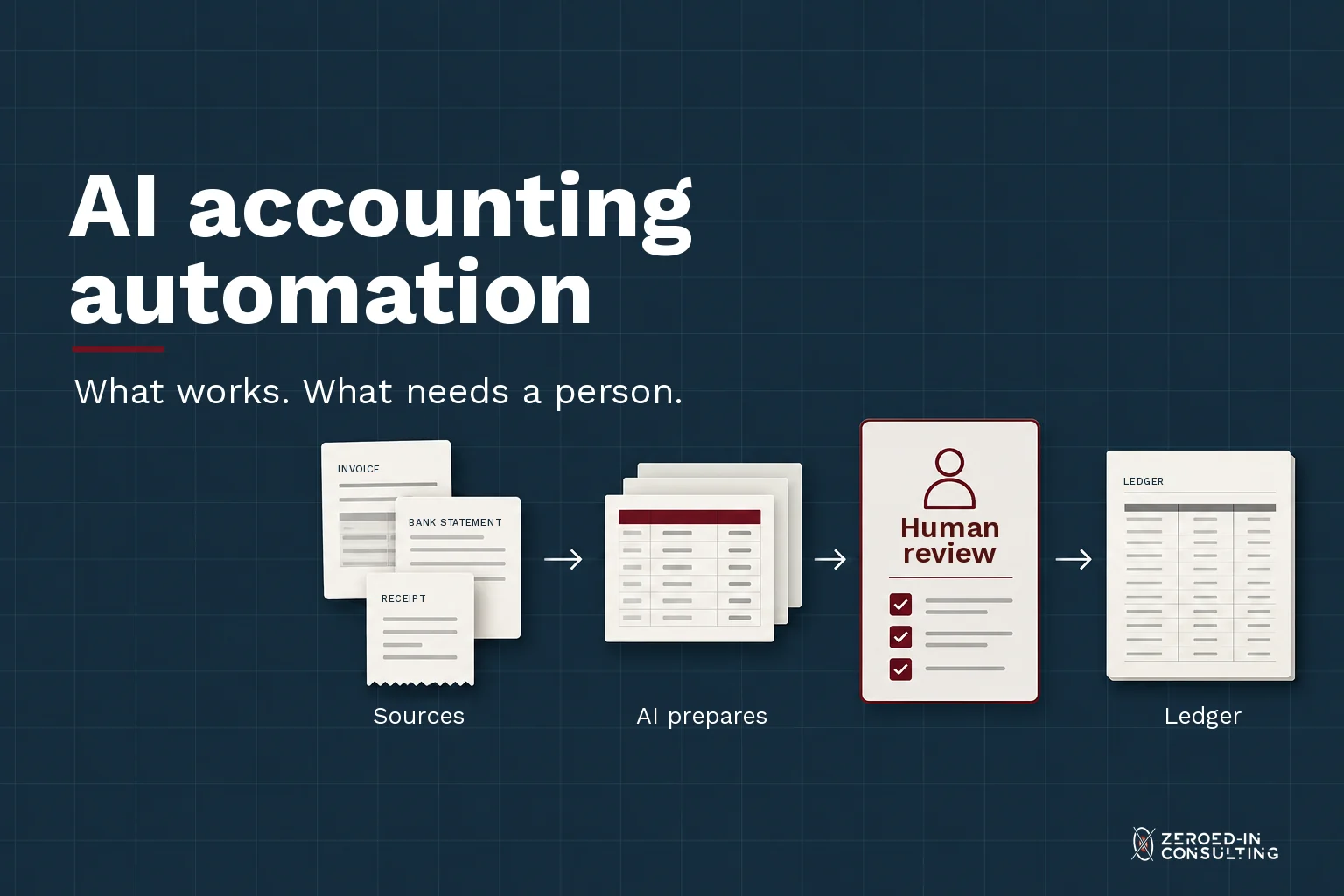
Most content on AI accounting automation comes from companies selling the software. This one comes from accountants who run these workflows in actual accounting departments every month.
A vendor has every reason to show you the demo where every transaction matches. We have every reason to tell you where it broke. We're the ones who had to fix it.
Below is what works in an accounting department today, what doesn't, and how to tell the two apart before you spend money finding out.
AI Accounting Automation Means Three Different Things
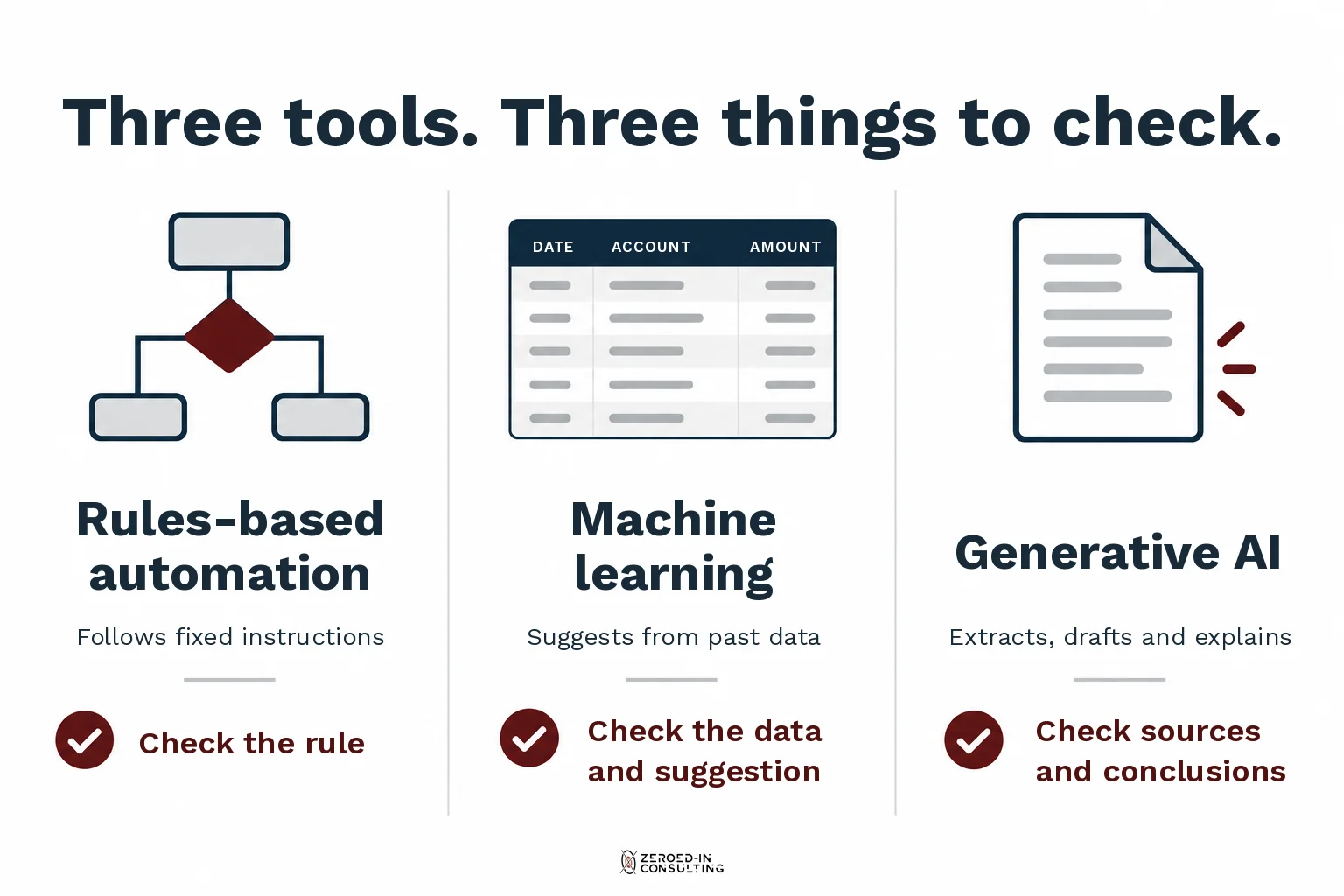
A lot of the confusion in this space comes from one phrase covering three very different tools.
Rules-based automation. Bank feed rules, recurring journal entries, auto-applied payments. It has been around for years and does exactly what you tell it, every time, and nothing else.
Machine learning. The matching and coding engines inside Ramp, Brex, and QuickBooks Online. It learns from your history and suggests a GL account or a match. Clean data makes it better, and messy data makes it worse.
Generative AI. Claude, ChatGPT, and the agents built on them. It reads contracts, drafts memos, writes Excel formulas, and builds reconciliation workpapers. It can handle work that used to need a person, but it can also be confidently wrong.
When someone tells you AI will cut your close in half, ask which of the three they mean. The answer changes what you need to control.
What Actually Works
Everything on this list follows the same pattern: the AI handles the volume, and a person checks the output against a source document before anything hits the ledger.
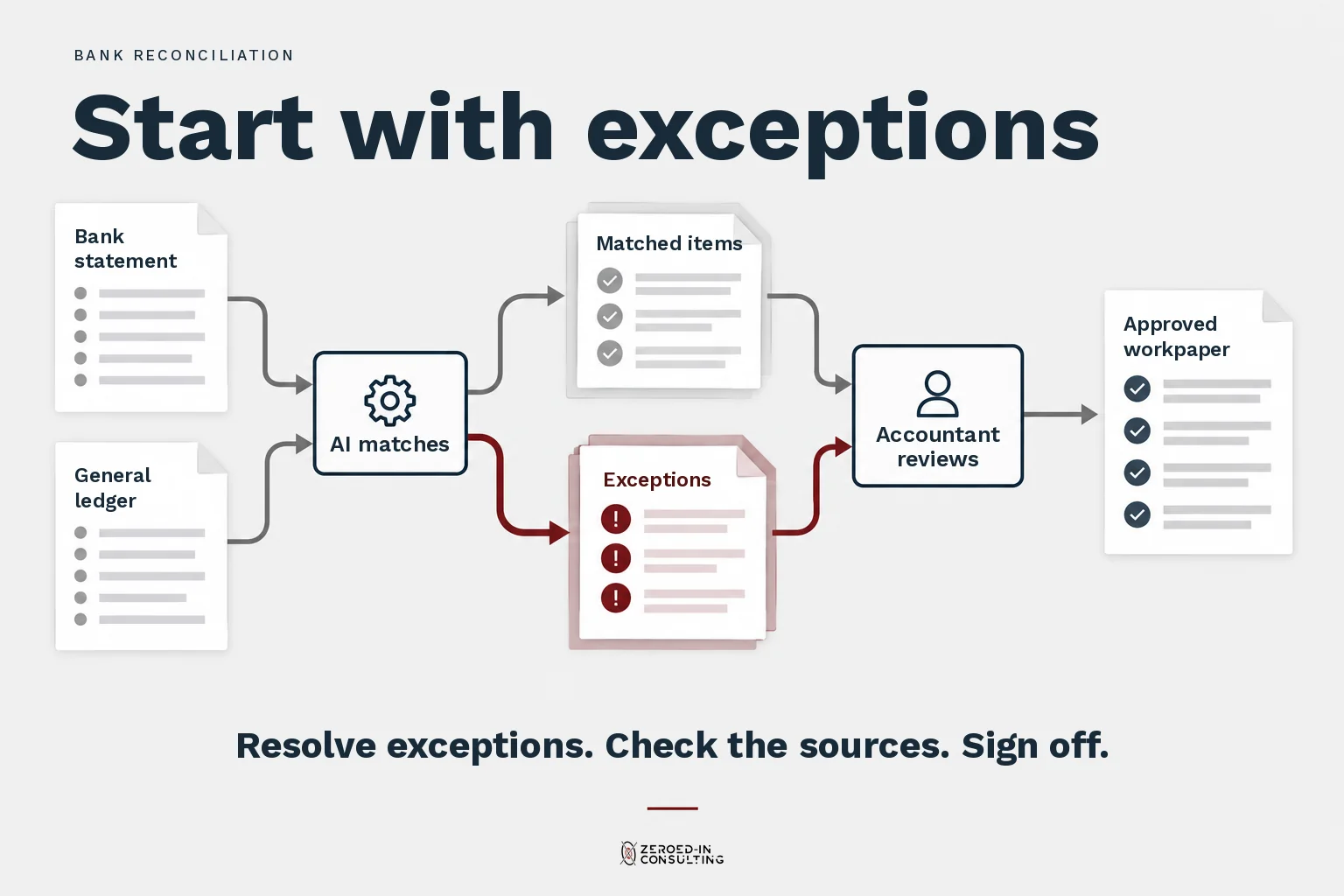
Bank and Credit Card Reconciliations
This is the clearest win we've seen. The AI tags the matches, flags what doesn't tie, and builds the workpaper. The reviewer spends their time on exceptions instead of scrolling past hundreds of lines that already match.
In our own practice, line-by-line bank rec matching used to eat hours. Now a reviewer clears the exceptions in minutes.
Transaction Coding With Review
Coding card spend and bills is repetitive and follows patterns. That's where machine learning does its best work. Ramp and Brex suggest the GL account, department, and memo from the receipt and your history. The accountant approves or corrects, and each correction improves the next suggestion.
The review is the whole point. A team that clicks approve-all has automated its mistakes.
Contract and Lease Abstraction
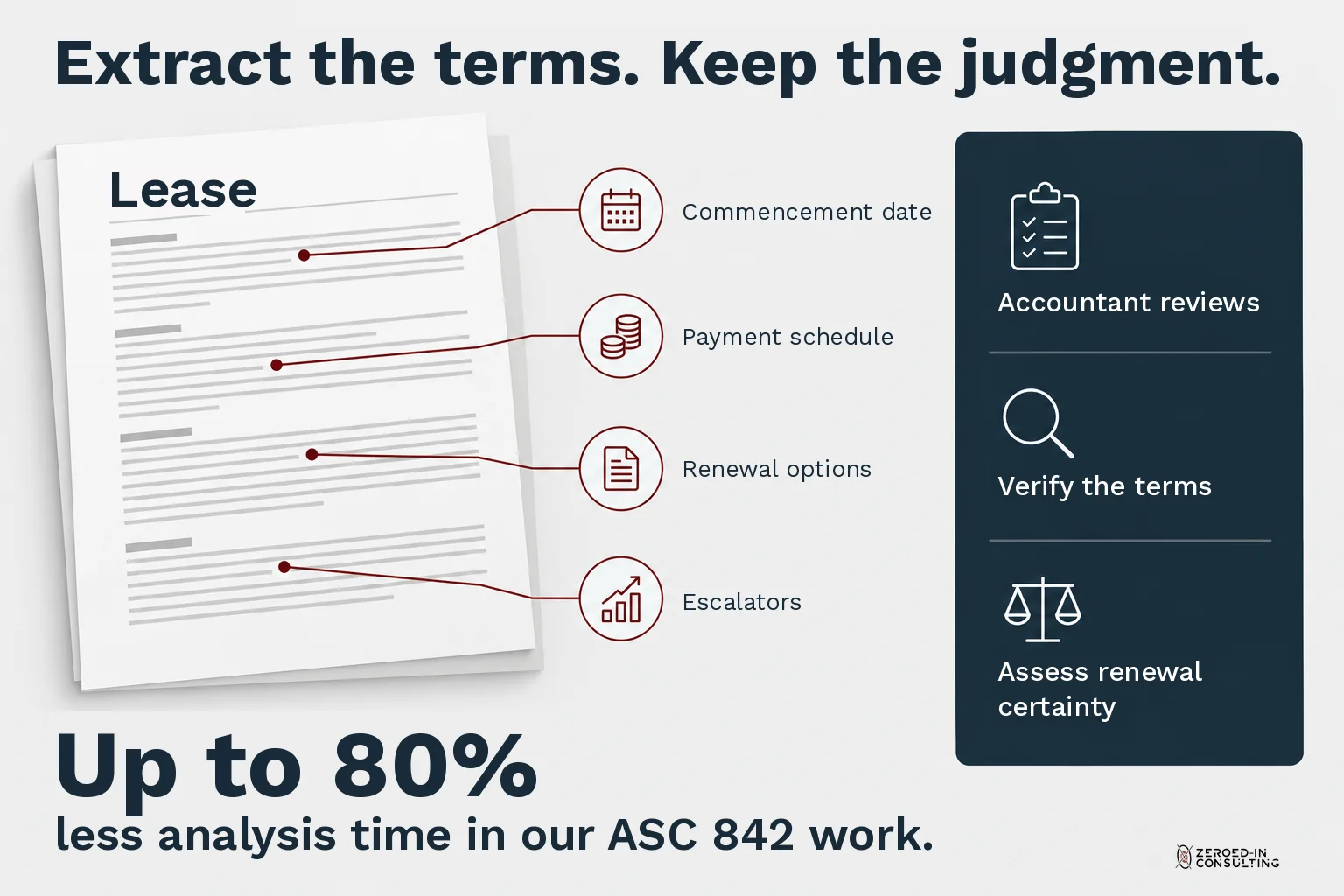
Pulling the commencement date, payment schedule, renewal options, and escalators out of a 60-page lease is slow, careful work. AI does the extraction well. That work used to mean days of manual schedule-building and cross-referencing. On ASC 842 implementations, AI-assisted analysis has cut our time by up to 80%.
Look at what the AI is doing there. It pulls terms from a document. An accountant still decides whether a renewal option is reasonably certain to be exercised. That's judgment, and it stays with us.
First Drafts of Technical Accounting Memos
Memos on debt modifications, preferred stock classification, and warrants follow a known structure and cite known guidance. AI writes a solid first draft that applies the framework to the facts.
A first draft is not a conclusion. Our technical accountants review every step, check every citation, and own the answer. The time savings come from never starting with a blank page.
Fixing Inherited Spreadsheets
Every accounting department has a workbook someone built five years ago that nobody wants to touch. Claude in Excel can read the formulas, explain what they do, and rebuild the file into a standard template without losing the logic. For one client, we rebuilt years of inconsistently structured Excel workbooks into standardized monthly reconciliation templates in a single session, keeping their data and logic intact. It's one of the least glamorous wins on this list and one of the most useful.
What Does Not Work (Yet)
These are the places we've watched AI accounting automation fail, in our own practice and in the books we inherit from new clients.
We Tried to Automate ASC 805 End to End. Three Times.
Business combination accounting is some of the most document-heavy work we do. Every deal starts with a purchase agreement and ends with a technical memo. Our time data showed more than 1,000 hours across 30 acquisitions. So we set out to build a bot that takes the agreement in and hands the memo back.
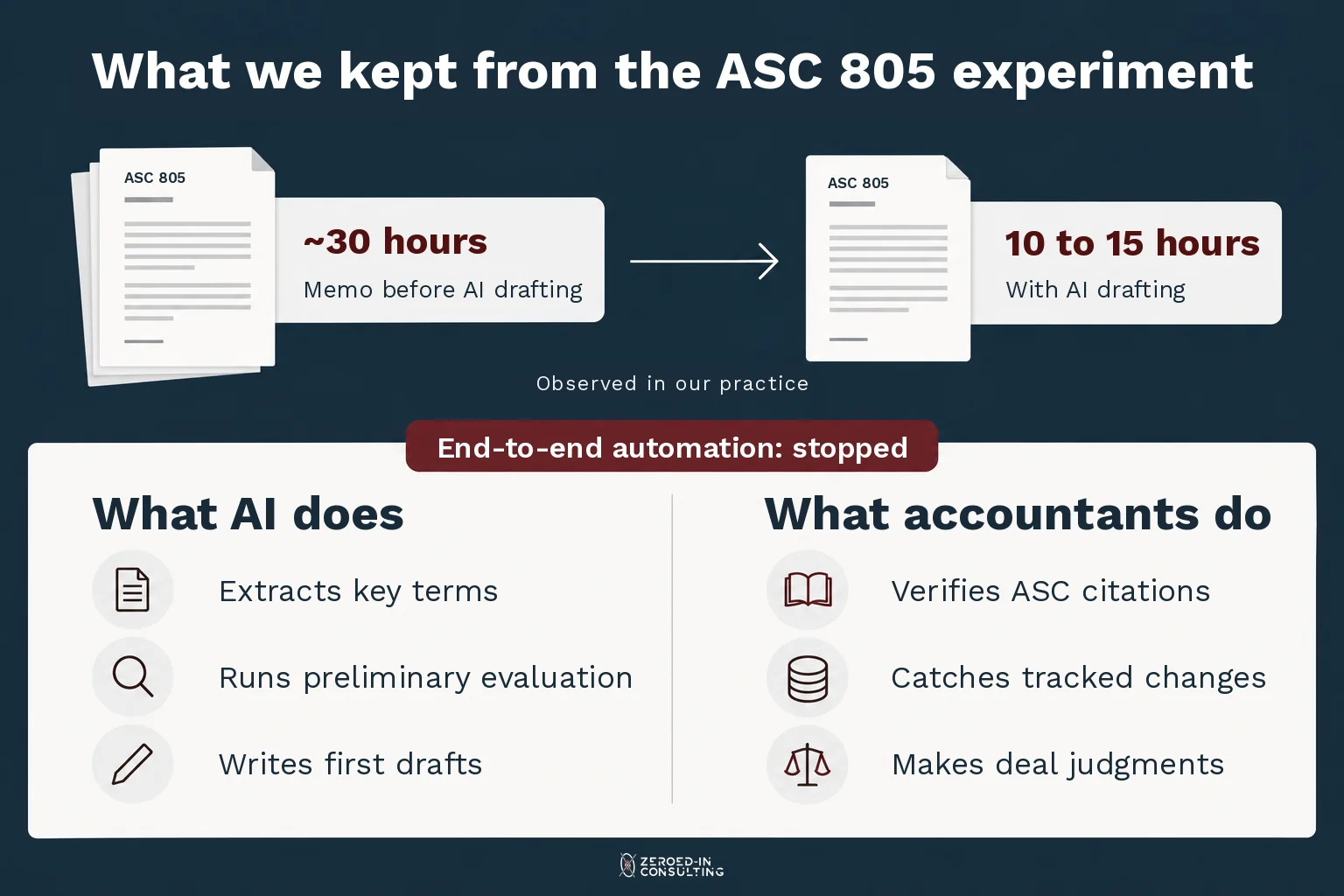
The first pieces worked. Pulling key terms out of a purchase agreement needed minimal edits. With AI drafting, our memos dropped from about 30 hours to 10 to 15.
Then the problems showed up. The AI cited the wrong ASC paragraphs. It pulled a number from a tracked change nobody had accepted. Both read as correct until a technical accountant checked them.
We rebuilt it twice. The third version was a long-running agent with about 30 of our past 805 memos as examples and one goal: build the whole thing. We shut it down.
There were too many edge cases. Every deal has assumptions that need a person, like whether a payment to the sellers is purchase price or compensation, or how to treat an earnout. Coding a rule for each one took more time than it saved.
So we kept what worked. AI extracts the key terms, runs the preliminary accounting evaluation, and writes the first draft. Our technical accountants make the calls and own the conclusion. AI does a great job of sounding right. Our job is to make sure it is right.
Pointing AI at a Messy GL
AI learns from your history. If your history is miscoded, the AI learns to miscode faster. Stale balances, suspense accounts nobody clears, and a chart of accounts with three different “Software” accounts all get carried forward.
Scope and clean the GL first. Then automate.
Letting AI Post to the Ledger With No Review Step
Some tools will post entries on their own. Keep that off until you've seen several months of clean output. A reviewer catches an error in five minutes. Left in the ledger until fieldwork, the same error becomes an audit adjustment.
Judgment Calls
Revenue recognition conclusions, CECL reserve assumptions, materiality, and whether a debt modification is really an extinguishment are all judgment calls. AI can lay out the framework and the arguments on each side. It can't own the conclusion, and your auditor won't accept “the AI said so” as support.
Multi-Entity, Consolidations, and Multi-Currency
Most AI accounting tools today are built for a single entity on QuickBooks Online. Ramp says as much in its own guidance for Ramp Stack. Intercompany eliminations, multiple currencies, and consolidations sit outside what most of these tools were built to handle.
One-Off Prompting
One person on your team gets great results from ChatGPT. Nobody else can repeat them, and the prompt lives in that person's chat history. That's a personal productivity trick, not automation.
What scales is a standard workflow. Same instructions, same inputs, same review step, every month, no matter who runs it. We build ours as repeatable “skills” with a human checkpoint built in.
Buying a Tool to Fix a Broken Process
If your close takes 20 days because nobody owns the accrual schedule, AI won't fix that. You'll get a faster version of the same mess. Fix ownership and process first. Then add the tool.
Where to Draw the Line
The line has little to do with how hard a task is. It comes down to two questions. Can a person check the output against a source document? And who signs off?
| Task | Automate? | Human role | Watch out for |
|---|---|---|---|
| Bank and card recs | Yes | Clear exceptions, approve the workpaper | Unmatched items aging with no follow-up |
| Transaction coding | Yes, with review | Approve or correct each suggestion | Approve-all habits |
| Lease and contract abstraction | Yes | Check terms against the contract, make the judgment calls | Missed renewal or termination clauses |
| Technical memo drafts | Draft only | Own the conclusion, verify every citation | Citations that look right and aren't |
| Spreadsheet rebuilds | Yes | Test new outputs against the old file | Logic changes nobody caught |
| Posting journal entries | Not without review | Review before anything posts | Errors that surface at audit |
| Revenue recognition, CECL, materiality | No | Make the call | AI framing the answer you hoped for |
| Consolidations and multi-currency | Not yet | Use proven tools and process | Vendor claims ahead of the product |
If you can't tie the output back to a source, keep the work with a person.
How to Start Without Breaking Your Close
Start small, with one workflow and a review step you trust. Here's the order we follow with clients.
- 1Scope the GL. Find stale balances, accounts that never clear, and miscoding before you automate anything.
- 2Pick one bottleneck. Choose the task that eats the most hours every month. For most teams, that's bank and card recs.
- 3Design the review step first. Decide who reviews, what they check, and where the support lives before you turn anything on.
- 4Run it side by side. Give it a month or two. Compare the AI's output to what your team would have done.
- 5Measure it. Track close days, hours per rec, and exception rates. If the numbers don't move, stop and figure out why.
- 6Expand one workflow at a time. Each new workflow gets its own review step and its own trial run.
Before we recommend any new tool, we ask four questions. Does it start with a real bottleneck? Do experts stay in control? Is there a clear audit trail? Does it fit the full environment? We walk through each one in our post on Ramp Stack.
Frequently Asked Questions About AI Accounting Automation
No. It changes what they spend their time on. Coding, matching, and moving data between systems shrink, while exception review, controls, and analysis grow. In our experience the bigger effect shows up in hiring. Teams stop adding headcount every time transaction volume grows.
Auditors accept workpapers with clear support and evidence of review. Who or what prepared the first draft matters less than whether a qualified person tied it to source documents and signed off. Keep the source, the output, and the reviewer's sign-off together. Bring your auditor in before year-end so fieldwork has no surprises.
You can start with what you have. Bank recs, spreadsheet cleanup, and memo drafts all work with a general AI tool and a disciplined workflow. Purpose-built platforms like Ramp Stack make sense when they fit your environment. Pick the workflow first and the tool second. Use a business plan that doesn't train on your data, and keep employee and customer details out of personal accounts.
John Ikosipentarhos
President / Co-Founder, Zeroed-In Consulting
John Ikosipentarhos is a CPA in Orange County, CA, with 10+ years in public and private accounting. Specializing in corporate accounting and finance, he helps companies leverage new technologies and automate workflows to reduce costs. He has a Bachelor’s in Business Administration with an Accounting emphasis from Cal State Fullerton.
Disclosure: Zeroed-In Consulting is a Ramp partner and may receive compensation when an eligible company signs up through our partner link.
Find Out What AI Can Actually Automate in Your Close
Every accounting department starts from a different place. We'll look at your close, your GL, and your systems, then tell you which workflows are ready for AI and which need cleanup first. If a tool won't help you, we'll say so. See how our AI accounting automation services work, or schedule a discovery call to talk through your workflow.
Schedule a Discovery Call
Related Articles
From Grunt Work to Higher-Value Work and Why Zeroed-In Is Collaborating with Ramp Stack
Zeroed-In's work with Ramp Stack reflects a deliberate approach to AI. We test new technology in real accounting workflows and adopt it when it creates meaningful client value.
John IkosipentarhosHow Co-Sourced, Outsourced & Fractional Accounting Fit Together for High-Growth Companies
Compare co-sourced, outsourced, fractional, and staff-augmentation accounting models to choose the right mix of ownership, capacity, and expertise for your company.
John IkosipentarhosWhat a Series B Finance Team Should Actually Look Like
A practical guide to structuring your startup finance team at Series B — balancing permanent hires with fractional and outsourced expertise.
John Ikosipentarhos